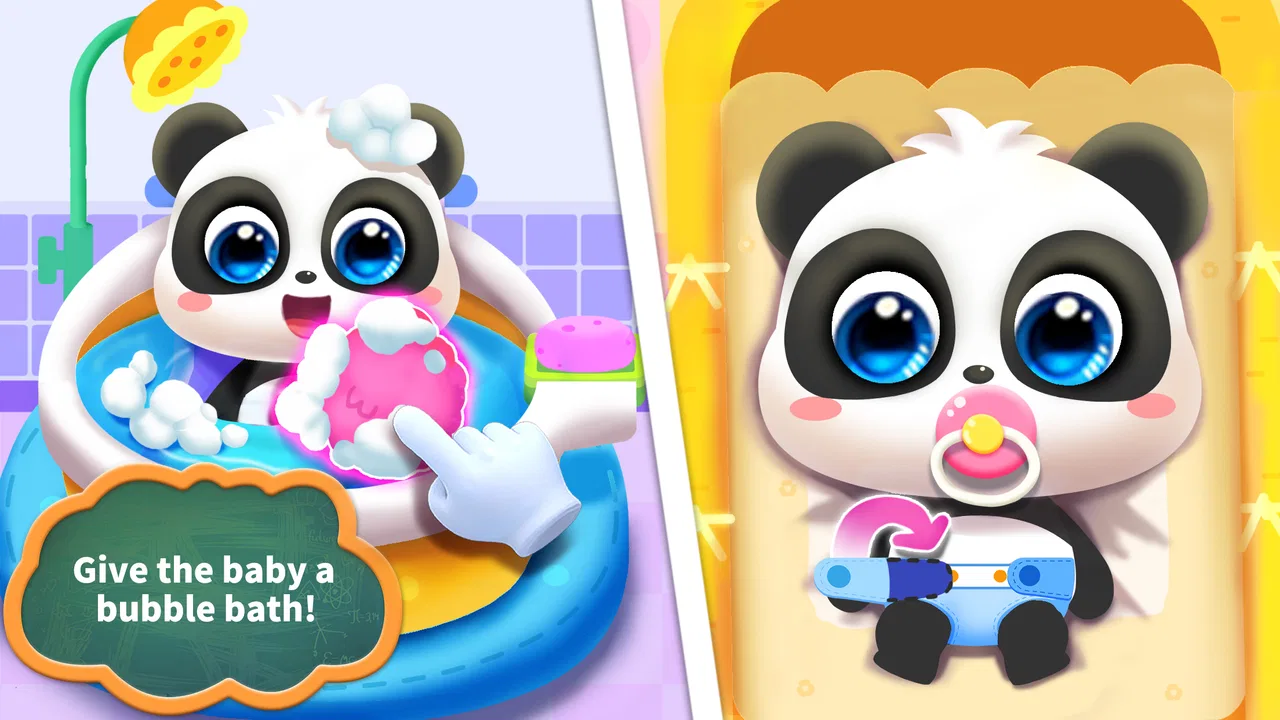
Baby Panda Care
- 3.8
- Rating
- 100.00M
- Installs
- Free
- Price

 Analysis by App-foxy
Baby Panda Care is the kind of educational game I would open with a young child when we want something gentle, simple, and easy to understand. Developed by BabyBus, it puts the player in the role of looking after a baby panda through everyday care activities. The central idea is immediately clear: choose an action, see how the panda reacts, complete a small task, and move on to the next bit of care.
That simplicity is its greatest strength. A child does not need to learn a complicated control scheme before feeling involved. At the same time, the game is not trying to be a full simulation of childcare. It is a playful introduction to routines such as feeding, playing, and settling a baby down. I found it most useful as a short shared activity rather than something I would leave running for a long independent play session.
How the care routine works in practice
I focus here on what makes the routine work for a young player: noticing the panda’s needs, choosing a response, and reading its reaction. I also consider how an adult can turn those quick interactions into a moment of conversation, rather than letting the child tap through automatically.
You May Also Like

 Blood Strike: 2.5 Anniversary
Blood Strike’s Loadouts Turn Every Drop Into a Tactical Gamble
A close look at Blood Strike’s custom loadouts: how fast access to signature weapons reshapes its battle royale rhythm, rewards preparation, and narrows the gap between fights.

 Pandora - Music & Podcasts
Pandora’s Music Is Easy to Start, but Harder to Recover
Pandora’s strength is its low-effort path from a seed to a station. Its weak spot is how much confidence it asks you to place in connection, setup, and quiet recovery.

 8 Ball Pool
8 Ball Pool Is Built on Rivalries, Rematches, and Routine
A close look at the rivalries, rematches, shared routines, and unanswered safety questions that turn a quick pool match into a persistent mobile community.

 Samsung Music
Samsung Music’s Quiet Strength Is Playing What You Already Own
Its reach comes less from spectacle than from dependable access to a personal library. That simplicity is both the app’s strongest retention engine and its ceiling.

 AccuWeather: Weather Radar
AccuWeather Review: A Quick, Clear Forecast for Everyday Decisions
For everyday plans, the best forecast is the one you can understand quickly. AccuWeather makes rain timing, radar, and local conditions easy to act on, with a few trade-offs.

 Hill Climb Racing
Why Hill Climb Racing Still Turns Crashes Into One More Run
A tiny car, a bumpy hill and one more upgrade: Hill Climb Racing keeps resurfacing because its simple chaos makes every near-miss feel personal.
More From Our News Desk



The first action is easy to understand
The game gets to its main activity quickly. The child interacts with the baby panda and responds to what it needs, using clear visual prompts rather than written explanations. That matters for younger players who may not read confidently yet. The first action usually feels obvious: feed the panda, play with it, or help it rest.
From a parent’s point of view, this creates a useful opening for conversation. I can ask, “What do you think the panda needs now?” before the child taps anything. The game then gives an immediate answer through the panda’s reaction. It turns a basic screen interaction into a small guessing-and-observing exercise, which is more valuable than simply pressing through a sequence of unrelated mini-games.
The controls are approachable, but the experience still benefits from an adult nearby at first. A child may understand the large visual cues but not always know why one action follows another. That is not a flaw in the design so much as a reminder that this is aimed at early learners. The best results come when the adult lets the child try first and only explains when the child gets stuck.
Action, response, and the feedback rhythm
The most satisfying part of the game is the short feedback loop. The child performs a care action, the panda responds, and the screen communicates that the task has gone well. This rhythm is easy to follow because the consequence arrives almost immediately. There is little waiting, no complicated inventory to manage, and no need to remember a long chain of instructions.
I especially like that the feedback is tied to the panda rather than presented as an abstract score alone. A smile, a calmer mood, or a more settled character makes the result understandable even to a child who cannot read numbers. The player learns through observation: when the panda is hungry, feeding helps; when it wants attention, play changes the mood; when it is tired, a quieter activity makes sense.
This is where the game earns its educational label. It does not teach through formal lessons or quizzes. Instead, it introduces sequencing, attention, and simple cause and effect. The child has to notice the current need, choose a suitable response, and watch what happens. Those are modest skills, but they are appropriate for a game built around caring for a young character.
There is also a useful emotional layer. The panda’s reactions encourage the child to treat the character as someone with changing needs rather than as a button that produces points. I would not describe this as a deep lesson in responsibility, but it can support conversations about noticing when someone is hungry, bored, or sleepy.
Why the reward works for younger players
The reward is less about winning than about restoring the panda’s comfort. That choice keeps the mood relaxed. A child can feel successful without having to beat a timer or compete against another player. For a preschool-age audience, that is often a better fit than a game built around failure and repeated penalties.
The reward also gives the session a natural purpose. The child is not performing tasks merely because the game says so; the panda’s improved state provides a visible reason to continue. Once the panda is cared for, the player can enjoy the satisfaction of having completed a small routine and then look for the next need.
One practical tip is to use the reward moment as a pause rather than immediately handing the device back. I found it more useful to ask the child what changed and what the panda might need later. This turns the game into a short learning conversation instead of a rapid chain of taps. It also helps prevent the child from focusing only on the animation that follows each action.
The game’s free price makes that kind of trial easy. Families can see whether the interaction suits their child before committing to anything. There are in-app purchases priced from $1.99 to $5.49 per item, so I would still check the purchase controls on the device before handing it over. The free entry is convenient, but the presence of optional purchases means the game is not completely free of financial considerations.
The reset is part of the appeal
After a care sequence ends, the experience can begin again with the same familiar pattern: notice a need, respond, receive feedback, and return to care. That reset is important for young children. Repetition is not wasted here; it gives them another chance to remember the relationship between an action and the panda’s reaction.
At the same time, the reset reveals the game’s limits. Players looking for a long adventure, a growing character, or a complex story may find the routine too circular. The reason to start another session is the comfort of repeating a known activity, not a large new objective. I see that as a good quality for short play, but a weakness for children who quickly need novelty.
For an everyday example, I could imagine using it while waiting for an appointment or during a calm transition before bedtime. A child can complete a small care routine without needing a large amount of space or preparation. If the child becomes restless after repeating the same actions, that is a useful signal to stop rather than push for a longer session.
What the game teaches without feeling like homework
Because the activities are presented through a baby panda, the game makes basic routines approachable. Feeding connects a need with a response. Playing shows that attention can change a mood. Rest introduces the idea that energetic activity is not always the right answer. These are simple lessons, yet the game presents them in a form that feels like play rather than instruction.
I would use it with a child who enjoys pretend play and likes caring for toy animals. The connection is especially natural for children who already feed dolls, put stuffed animals to bed, or imitate adults looking after younger family members. The digital panda gives those familiar behaviors a clear sequence and immediate reaction.
However, I would not rely on it to teach detailed health, nutrition, or sleep guidance. The game simplifies care for accessibility, and that is appropriate for its audience. Parents should treat the activities as imaginative play, not as a substitute for real-world explanations or routines.
Where it compares well with other children’s games
Compared with fast arcade games, this one is calmer and easier to follow. There is no need for quick reflexes, advanced reading, or a strong competitive instinct. Compared with open-ended digital toys, it gives the child more direction: the panda has a need, the child chooses an action, and the result is visible.
Its trade-off is depth. A drawing app may offer more creative freedom, while a storybook app may provide richer language and narrative. A broader educational suite may cover letters, numbers, or puzzles more directly. Baby Panda Care is narrower, but that narrow focus helps it remain approachable for a child who might be overwhelmed by a large menu of activities.
I would choose it over a noisy reward-heavy game when the goal is a brief, cooperative activity. I would choose a different option when the child needs structured literacy practice, open-ended creativity, or a challenge that develops problem-solving over a longer period. The right choice depends less on age alone and more on what the child wants from the screen at that moment.
Small frictions parents should expect
The main friction is repetition. The care loop is clear, but its clarity means the game can become predictable. A parent may enjoy the first few sessions more than a child who wants constant change. I recommend treating it as a game to rotate with books, physical pretend play, drawing, and other learning activities rather than as the only app on the device.
Another consideration is supervision around purchases. The game is free to start, but optional items cost between $1.99 and $5.49 each. Even when a child is focused on the panda, a curious tap can lead toward a purchase screen in many mobile games. I would use the device’s purchase protections and explain that the game has a boundary around buying extras.
Device compatibility is also worth checking. The current version is 8.75.00.01 and requires Android 6.0 or later. That makes it suitable for many older devices, but a very old phone or tablet may still provide a less comfortable experience because of screen size or performance. I would test the controls myself before deciding whether the device is suitable for a child to use independently.
The Everyone content rating is reassuring for families seeking a child-friendly starting point. Even so, an age label cannot replace a quick look at how a particular child responds to the game. Some children will enjoy the gentle repetition, while others may find it too slow or too limited after the novelty fades.
Who will get the most from it
This game is a strong match for younger children who enjoy animal characters, pretend caregiving, and short guided activities. It also works well for adults who want an easy way to start a conversation about needs and routines without turning the moment into a lesson. The visual feedback makes it accessible when reading ability is still developing.
I would be more cautious about recommending it to an older child who expects progression, exploration, or a substantial challenge. The game’s appeal comes from the immediate care cycle, not from mastering a demanding system. Likewise, it is not the best pick for a child who becomes frustrated by repeating familiar activities or who mainly wants creative control over what happens on screen.
Its popularity is substantial, with over 100 million installs and an average rating of 3.7 from around 196 thousand ratings. Those figures suggest that many families have tried it, but they do not remove the need to judge whether its slow, repetitive style fits one particular child.
My verdict on the complete loop
After trying the game as a care routine rather than expecting a large adventure, I found its design easy to appreciate. The first action is clear, the panda’s response arrives quickly, the reward is understandable, and the reset makes another short session feel natural. The strongest reason to play again is the satisfying rhythm of helping the panda feel better, not a deep progression system.
BabyBus has kept the experience focused, and that focus makes it useful for calm moments. I can recommend it as a free educational game for families who want gentle pretend play on Android, provided they are comfortable managing optional purchases and setting reasonable session limits. It is best enjoyed with an adult occasionally asking questions, not as a replacement for hands-on play.
My final recommendation is therefore specific: download it if your child likes nurturing animal characters and benefits from clear, repeated routines. Skip it if you are searching for advanced learning content, open-ended creation, or a game that stays surprising for a long time. For the right child, Baby Panda Care turns a few simple actions into a friendly lesson about noticing, responding, and trying again.
FAQs for Baby Panda Care
01What is Baby Panda Care and what can users expect from the game?
Baby Panda Care is an engaging educational game designed for young children. Players can interact with an adorable baby panda, helping it with daily activities such as eating, bathing, and sleeping. The game features colorful graphics and simple controls, making it ideal for toddlers and preschoolers to learn and have fun.
02Is Baby Panda Care safe for children to play?
Yes, Baby Panda Care is specifically created with young children in mind, ensuring a safe and secure gaming environment. The content is age-appropriate, free from harmful or violent elements, and is designed to promote learning and development. Parents can feel confident allowing their children to play this game.
03What are the main educational benefits of Baby Panda Care?
Baby Panda Care offers several educational benefits, including developing fine motor skills through interactive tasks and fostering a sense of responsibility by caring for the panda. The game also enhances cognitive abilities as children follow routines and solve simple problems, making it a valuable tool for early childhood education.
04Are there any in-app purchases in Baby Panda Care?
While Baby Panda Care is free to download, it may offer optional in-app purchases. These purchases can include additional content or features that enhance the gameplay experience. It's advisable for parents to monitor and manage these settings to ensure children do not accidentally make purchases.
05Does Baby Panda Care require an internet connection to play?
No, Baby Panda Care does not require an internet connection for its main gameplay features. This makes it convenient for children to play anywhere, whether on a long car ride or at home. However, some features or updates might need a connection, so occasional internet access could be beneficial.
Pros
- Engaging and educational gameplay.
- Adorable graphics and design.
- User-friendly interface for kids.
- Offers a variety of activities.
- Frequent updates with new content.
Cons
- In-app purchases can be frequent.
- Requires internet for some features.
- May include ads in free version.
- Limited parental control options.
- Can be repetitive over time.

Baby Panda Care
Gallery